Dashboard
Tip
To read the entire answer to a FAQ,
click the arrow icon ( ) below any question to
expand or collapse it.
) below any question to
expand or collapse it.
How can I view accessions after submitting metadata?
Click to view answer
Hint
GenBank accession numbers follow the format GCA_XXXXXXXXX. They are
automatically assigned by
ENA and can be viewed on the
National Centre for Biotechnology Information (NCBI) website using the link:
https://www.ncbi.nlm.nih.gov/datasets/genome/?bioproject=<project-id>
where <project-id> is the project ID or study
ID associated with the profile used to submit the
files in COPO.
- Option 1: View accessions in the data table
-
Scroll to any column that ends with
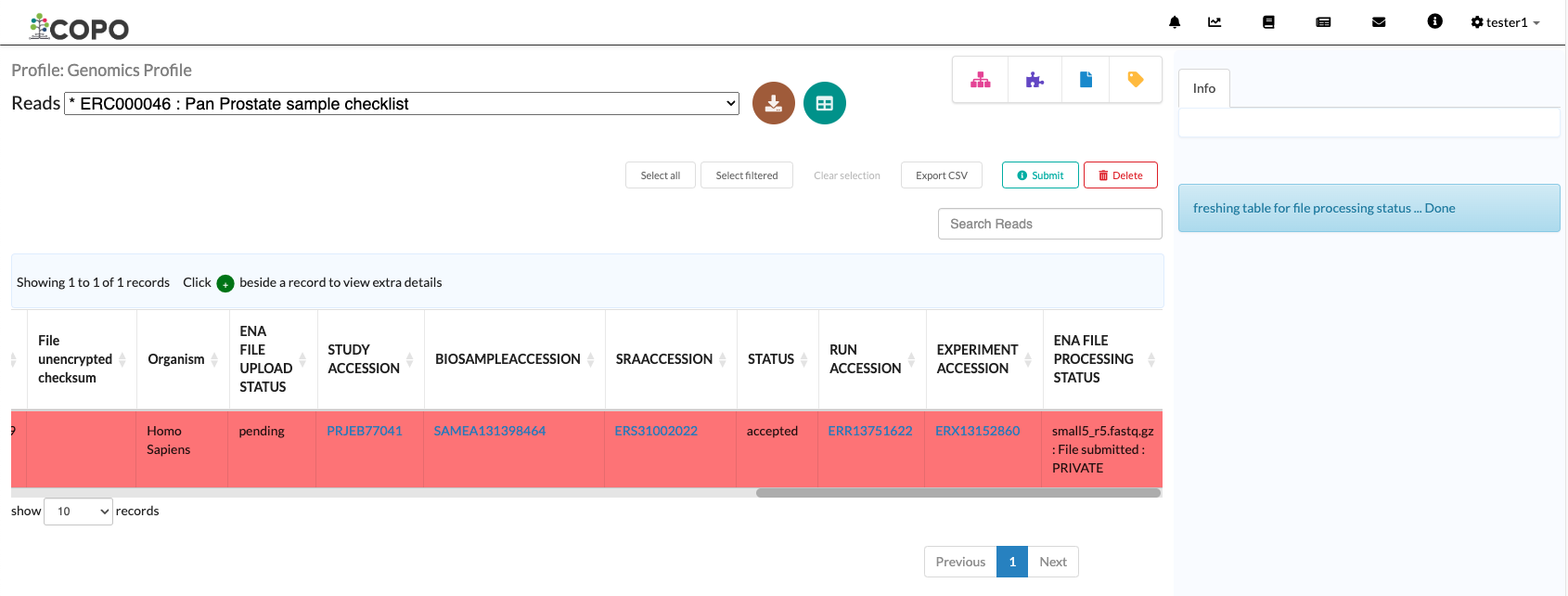
accessionas depicted in the image below to view the accessions.Note
The table row is highlighted in red in the image below because the files associated with the record are either still being processed or have encountered issues during processing.

Accessions column in the data table
Option 2: Accessions page
Click the
button.
The accessions page will be displayed.
- Option 3: Accessions dashboard
-
Navigate to the Accessions dashboard to view accessions
Can submissions be analysed?
Yes, the following are ways to analyse metadata submissions:
Tree of Life dashboard * Alternatively, click the
 button.
Tree of Life inspection page * Alternatively, click the
 button.
Tree of Life inspection by Genome Acquisition Lab page * Alternatively, click the
 button.