Choosing a Profile
COPO supports multiple profile types, each tailored to specific data submission requirements.
Here is a list of profiles that can be created:
Profile Types Legend
The Profile types legend [1] is displayed at the right of the Work profiles page. It displays the acronym as well as the corresponding profile type colour for each profile that has been created.
Hint
Hover over the  icon located beside the profile type acronym in
the Profile types legend, the backronym for the profile type will be
displayed.
icon located beside the profile type acronym in
the Profile types legend, the backronym for the profile type will be
displayed.
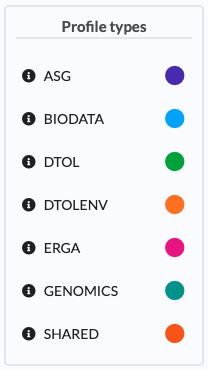
Profile Types Legend: Various profiles types that can be created in COPO and their corresponding label colours
Colour |
Acronym |
Backronym |
|---|---|---|
Purple |
ASG |
Aquatic Symbiosis Genomics |
Blue |
BIODATA |
Biodata |
Green |
DTOL |
Darwin Tree of Life |
Orange |
DTOLENV |
Darwin Tree of Life Environmental |
Pink |
ERGA |
European Reference Genome Atlas |
Teal |
GENOMICS |
Genomics |
Orange |
SHARED |
Shared With Me |


Footnotes