Component
Components [1] are individual elements or modules that make up the profile. These can include various functionalities or data points that contribute to the profile’s overall purpose.
Component Database Table Structure
Each component that make up a profile has specific settings and functionalities that contribute to the profile’s overall purpose.
The PostgreSQL table Component consists of the following fields:
id(Integer): The unique identifier for the componentname(String): The name of the componenttitle(String): The display title of the componentwidget_icon(String): The icon associated with the componentwidget_colour(String): The colour associated with the component, used for UI elementswidget_icon_class(String): The CSS class for the icontable_id(String): The identifier for the associated tablereverse_url(String): The URL used for reversing the componentsubtitle(String): The subtitle of the component, providing additional contextbutton_label(String): The label for the button associated with the component.schema_name(String): The name of the schema associated with the component, if applicablebase_component(String): The base component that the current component is derived from, if applicable.
Hint
Click the  button below to view the contents
Component database fields
 id |         name         | title                   | widget_icon      | widget_colour | widget_icon_class   | table_id                  | reverse_url                                               | subtitle            | button_label           | schema_name         | base_component
----+----------------------+-------------------------+------------------+---------------+---------------------+---------------------------+-----------------------------------------------------------+---------------------+------------------------+---------------------+---------------
  1 | accessions           | Accessions              | sitemap          | pink          | fa fa-sitemap       | accessions_table          | copo_accession:copo_accessions                            |                     | View Accessions        |                     |
  2 | accessions_schema    | Accessions              | sitemap          | pink          | fa fa-sitemap       | accessions_schema_table   | copo_accessions_schema:copo_accessions_schema             | #component_subtitle | View Accessions        |                     |
  3 | assembly             | Assembly                | puzzle piece     | violet        | fa fa-puzzle-piece  | assembly_table            | copo_assembly_submission:copo_assembly                    |                     |                        |                     |
  4 | files                | Data files              | file             | blue          | fa fa-file          | files_table               | copo_file:copo_files                                      |                     |                        |                     |
  5 | general_sample       | Samples                 | filter           | olive         | fa fa-filter        | sample_table              | copo_sample:copo_general_samples                          | #component_subtitle | Manage Sample metadata |                     |
  6 | images_rembi         | General                 | image            | coral-pink    | fa fa-image         | singlecell_table          | copo_single_cell_submission:copo_singlecell               | #component_subtitle |                        | COPO_IMAGE_REMBI    | singlecell
  7 | images_stx_fish      | Spatial Transcriptomics | image            | terra-cotta   | fa fa-image         | singlecell_table          | copo_single_cell_submission:copo_singlecell               | #component_subtitle |                        | COPO_IMAGE_STX_FISH | singlecell
  8 | profile              | Work profiles           |                  |               |                     | copo_profiles_table       |                                                           | #component_subtitle |                        |                     |
  9 | read                 | Reads                   | dna              | orange        | fa fa-dna           | read_table                | copo_read_submission:copo_reads                           | #component_subtitle |                        |                     |
 10 | reads_schema         | Reads                   | dna              | orange        | fa fa-dna           | singlecell_table          | copo_single_cell_submission:copo_singlecell               | #component_subtitle |                        | COPO_READ           | singlecell
 11 | sample               | Samples                 | filter           | olive         | fa fa-filter        | sample_table              | copo_sample:copo_samples                                  |                     | Manage Sample metadata |                     |
 12 | seqannotation        | Sequence annotations    | tag              | yellow        | fa fa-tag           | seqannotation_table       | copo_seq_annotation_submission:copo_seq_annotation        |                     |                        |                     |
 13 | singlecell           | Single-cell             | bacterium        | green         | fa fa-bacterium     | singlecell_table          | copo_single_cell_submission:copo_singlecell               | #component_subtitle |                        | COPO_SINGLE_CELL    |
 14 | taggedseq            | Barcoding manifests     | barcode          | red           | fa fa-barcode       | tagged_seq_table          | copo_barcoding_submission:copo_taggedseq                  | #component_subtitle |                        |                     |
Description of each Component record
-
accessions and accessions_dashboard:
Both relate to the accessions component. The accessions component provides a platform for retrieving and analysing biological samples that have biosample accession, SRA accession and submission accession associated with them as part of a project after the samples have been accepted.
-
assembly: Assembly component
The assembly component provides a platform for aligning and merging fragments of a Deoxyribonucleic acid (DNA) sequence to reconstruct the original structure of the DNA.
-
- files: Data files component
-
With this component, data files can be uploaded from a cluster or from one’s local (computer) system.
-
- images_rembi: General images component
-
Images based on Recommended Metadata for Biological Images (REMBI) standard can be uploaded using this component.
-
- images_stx_fish: Spatial Transcriptomics images component
-
Spatial Transcriptomics images can be uploaded via this component.
-
- profile: Work profiles component
-
The first step to getting work done in COPO is to create a work profile. A profile is a collection of ‘research objects’ or components that form part of one’s research project or study.
-
read and reads_schema: Reads component
This component is associated with assembled and annotated sequences representing interesting features or gene regions.
-
sample and general_sample: Samples component
Biological samples, obtained as part of a project, are described and managed in this component.
-
seqannotation: Sequence Annotations component
Specific features, in this component, are marked in a Deoxyribonucleic acid (DNA), Ribonucleic acid (RNA) or protein sequence with descriptive information about structure or function. Sequence annotations are usually done after a genome is sequenced and assembled.
-
singlecell: Single-cell component
Single-cell data can be managed using this component.
-
taggedseq: Barcoding Manifests component
This component provides a platform for submitting assembled and annotated sequences representing interesting features or gene regions.
Creation of Component
Note
This section assumes that you have installed Django, Python and created a Django project.
The migrations folder is automatically created within your app directory when you create your app. It contains database migration files.
See also
Django application structure for an snapshot of Django application’s structure
To create a component in the project, a Django application has to be created for the component. Then, the component has to be associated with a profile type defined in the ProfileType structure section. This association will allow the component to be accessible and visible on the Work profiles page.
Explore the implementation details of each component of the Django application used in the COPO project through the links provided below:
Other Django applications created in the COPO project can be found in the
src/apps folder of the COPO GitHub repository.
cd <path-to-project>/COPO-production
python manage.py startapp myapp
INSTALLED_APPS = [
     # ... other installed apps,
     'myapp',
]
mkdir myapp/static
mkdir myapp/static/myapp/css
cd myapp/static/myapp/css
touch myapp.css
mkdir myapp/static/myapp/js
cd myapp/static/myapp/js
touch myapp.js
mkdir -p myapp/templates/myapp
from django.apps import AppConfig

class MyappConfig(AppConfig):
    default_auto_field = 'django.db.models.BigAutoField'
    name = 'myapp'
from django.urls import path
from . import views

urlpatterns = [
   path('', views.index, name='index')
]
from django.shortcuts import render
from .models import ProfileType, Component

def index(request):
    profile_type_models = ProfileType.objects.all()
    component_models = Component.objects.all()

    return render(request, 'myapp/index.html', {'profile_type_def':
    profile_type_models, 'component_def': component_models})
Create an
component.htmlfile inside myapp/templates/myapp:
Component example template
<!-- myapp/templates/myapp/component.html -->
{% load static %}
<!DOCTYPE html>
<meta charset="utf-8">
<html lang="en">
    <head>
        <meta charset="utf-8">
        <meta http-equiv="X-UA-Compatible" content="IE=10">
        <meta name="viewport" content="width=device-width, initial-scale=1">

        <title>My App</title>

        <link rel="stylesheet" href="{% static 'myapp/css/myapp.css' %}">
        <script src="{% static 'myapp/js/myapp.js' %}"></script>

        <script>
            const component_def = {
              {% for component in component_def %}
                {{ component.name|lower }}:  {
                  component: '{{ component.name }}',
                  title: '{{ component.title }}',
                  {% if component.subtitle %}
                  subtitle: '{{ component.subtitle }}',
                  {% endif %}
                  iconClass: '{{ component.widget_icon_class }}',
                  semanticIcon: '{{ component.widget_icon }}',
                  buttons: [ {% for button in component.title_buttons.all %} '{{ button.name }}', {% endfor %} ],
                  sidebarPanels: ['copo-sidebar-info'],
                  colorClass: '{{ component.widget_colour_class }}',
                  color: '{{ component.widget_colour }}',
                  tableID: '{{ component.table_id }}',
                  recordActions: [ {% for button in component.recordaction_buttons.all %} '{{ button.name }}', {% endfor %} ],
                  url: "{% if component.reverse_url %}{% url component.reverse_url profile_id='999' %}{% endif %}",
                },
              {% endfor %}
            }

        const title_button_def = {
          {% autoescape off %}
              {% for button in title_button_def %}
                {{ button.name  }} : {
                  template: `{{ button.template }}`,
                  additional_attr: '{{ button.additional_attr }}',
                  },
              {% endfor  %}
          {% endautoescape %}
        }

        const profile_type_def = {
          {% for profile_type in profile_type_def %}
            {{ profile_type.type|lower }}:  {
              title: '{{ profile_type.type | upper }}',
              widget_colour: '{{ profile_type.widget_colour }}',
              components: [ {% for component in profile_type.components.all  %} '{{ component.name }}', {% endfor %} ]
            },
          {% endfor %}
        }
        function get_profile_components(profile_type) {
            return profile_type_def[profile_type.toLowerCase()].components.map(component => component_def[component]);
        }
        </script>
    </head>
    <body>
        <div class="container">
            <div class="row">
                <div class="col-sm-9 col-md-9 col-lg-9">
                    <div hidden id="hidden_attrs">
                       <!-- hidden attributes  -->
                       <input type="hidden" id="nav_component_name" value="component_name"/>
                    </div>
                    <div class="global-page-title">
                        {% block page_tile %}
                        {% endblock page_tile %}
                    </div>
                    {% block content %}
                        <!-- getting started section -->
                        <div class="row">
                            <div class="col-sm-5 col-md-5 col-lg-5 col-xs-offset-0 page-welcome-message"
                                 style="display: none;">
                                <div class="copo-webui-popover">
                                    <div class="webui-popover-inner">
                                        <h3 class="copo-webui-popover-title">Getting started</h3>
                                        <div class="copo-webui-popover-content">
                                            <div class="webpop-content-div">Welcome to the page
                                            </div>
                                        </div>
                                    </div>
                                </div>
                            </div>
                        </div>

                        <!-- component_table -->
                        <div id="component_table_loader" class="col-sm-5 col-md-5 col-lg-5 col-xs-offset-5"
                             data-copo-tour-id="component_name_table">
                        </div> <!-- div used by the quick tour agent -->
                        <div class="table-parent-div">
                            <table id="component_name_table" class="ui celled table hover"
                                   cellspacing="0" width="100%">
                            </table>
                        </div>
                    {% endblock content %}
                </div>
                <div class="col-sm-3 col-md-3 col-lg-3">
                  {% block component_info %}
                        <div style="display:none; margin-top: 30px; " id="component_name_info" class="alert alert-info"  role="alert"></div>
                  {% endblock component_info %}
               </div>
            </div>
         </div>
    </body>
</html>
Create the following files in the application directory:
admin.py- to register models with the Django admin site. See the Registering Django models section for more information.models.py- to define database models. See the Defining Django models section for more information.tests.py- to write tests for the Django application.
Visualisation of Created Component

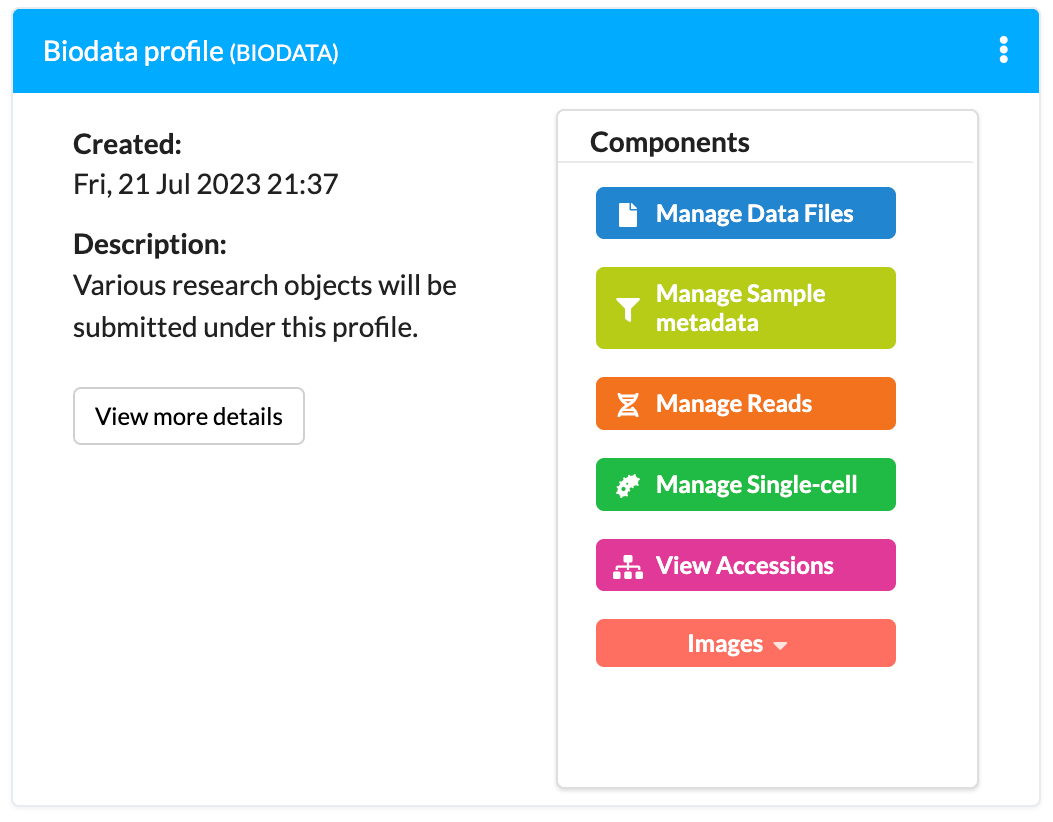


Components that make up Tree of Life (ToL) profiles


Components that make up Biodata profiles
Each profile will have a set of components that are associated with it. These components will be displayed on a profile on the Work profiles page.
Components will also appear to the top-right of pages for easy navigation to them, depending on the component that is being viewed. For example,the Reads component leads to the Reads page and the other components are displayed as indicated by the arrows in the image below:
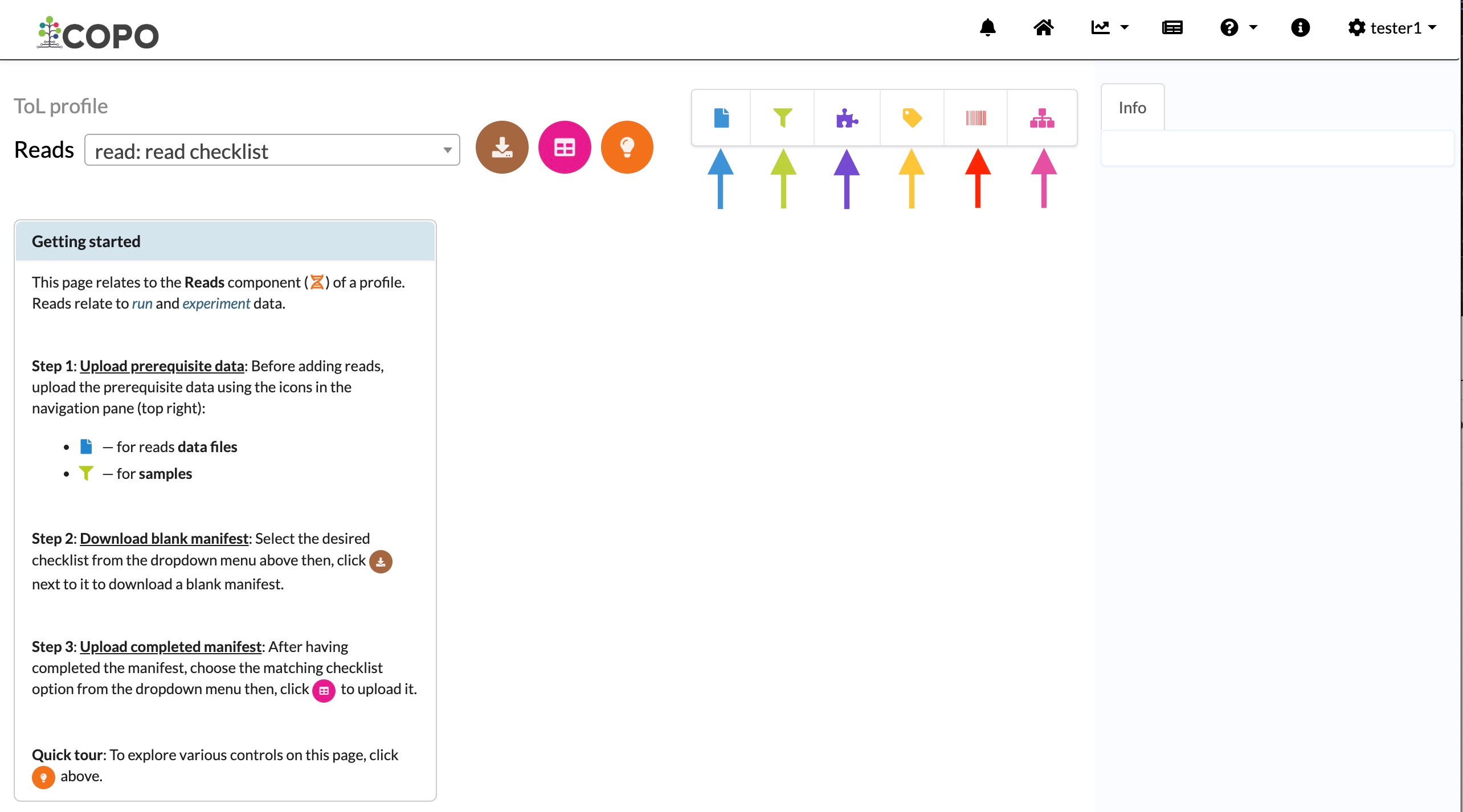
Reads page: Other components are displayed at the top-right of the screen and can be clicked for easy navigation
If the current page is not the Reads page, the Reads component icon,
 , will be displayed in the navigation pane.