RecordActionButton
Record action buttons are individual elements or modules that make up the profile and managed through a Django Admin model. Each button in the profile serves a specific function, enabling users to perform various actions on records within the profile.
RecordActionButton Database Table Structure
The RecordActionButton in Django Admin provides a structured way to manage and perform actions on profile records. Each button is meticulously defined with attributes that ensure it functions correctly and provides clear feedback to users.
These actions can include creating, updating, submitting or deleting records among other functions. Understanding the fields and their purposes can significantly enhance the management and usability of profiles in a Django application.
The PostgreSQL table RecordActionButton consists of the following fields:
-
-
id(Integer): -
The unique identifier for the action button. It is auto-incremented by the database.
-
-
-
name(String): -
The internal name of the action button, used in the back-end code to reference the button.
-
-
-
title(String): -
The display title of the action button, shown to users in the UI. It describes the action the button performs in a concise manner.
-
-
-
label(String): -
The short label shown on the button, providing a brief indication was the button does.
-
-
-
type(String): -
The type of action the button performs, such as single (acting on a single record) or multi (acting on multiple records).
-
-
-
error_message(String): -
The error message displayed to users if the action cannot be completed. This helps in providing feedback to users about why an action failed.
-
-
-
icon_class(String): -
The CSS class for the icon associated with the button, providing a visual representation of the button’s action and help improve user interface design.
-
-
-
action(String): -
The specific action performed by the button, often mapped to a function or a URL ndpoint that the action will call.
-
-
-
icon_colour(String): -
The colour of the icon used for UI consistency and visual cues thereby helping users to quickly identify the type of action.
-
-
-
tour_id(String): -
The identifier for the tour associated with the button. It links the button to a specific tour that provides guidance or help messages to users.
-
Hint
Click the  button below to view the contents
Example records for the ProfileActionButton model, detailing the various actions available within a profile
 id |              name                       |                   title                    |          label           |  type  |                                     error_message                                     |      icon_class       |          action                     | icon_colour |             tour_id
----+-----------------------------------------+--------------------------------------------+--------------------------+--------+---------------------------------------------------------------------------------------+-----------------------+-------------------------------------+-------------+----------------------------------
  1 | add_local_all                           | Add file by browsing local file system     | Add                      |        | Add file by browsing local file system                                                | fa fa-desktop         | add_files_locally                   | blue        | add_file_record_button_local
  2 | add_record_all                          | Add record                                 | Add                      |        |                                                                                       | fa fa-plus-circle     | add                                 | blue        | add_record_button
  3 | add_terminal_all                        | Add file by terminal                       | Add                      |        |                                                                                       | fa fa-terminal        | add_files_by_terminal               | blue        | add_file_record_button_terminal
  4 | delete_read_multi                       | Delete records                             | Delete                   | multi  | Please select one or more records to delete                                           | fa fa-trash-can       | delete_read                         | red         | delete_record_button
  5 | delete_record_multi                     | Delete records                             | Delete                   | multi  | Please select one or more records to delete                                           | fa fa-trash-can       | validate_and_delete                 | red         | delete_record_button
  6 | delete_sample_multi                     | Delete records                             | Delete                   | multi  | Please select one or more records to delete                                           | fa fa-trash-can       | delete_sample                       | red         | delete_record_button
  7 | delete_singlecell_multi                 | Delete records                             | Delete                   | multi  | Please select one or more records to delete                                           | fa fa-trash-can       | delete_singlecell                   | red         | delete_record_button
  8 | download_general_sample_manifest_single | Download manifest                          | Download manifest        | single | Please select one of samples in the manifest to download                              | fa fa-download        | download-sample-manifest            | blue        | download_manifest_record_button
  9 | download_permits_multiple               | Download permits                           | Download permits         | multi  | Please select one or more sample records from the table shown to download permits for | fa fa-download        | download-permits                    | orange      | download_permits_record_button
 10 | download_sample_manifest_single         | Download manifest                          | Download manifest        | single | Please select one of samples in the manifest to download                              | fa fa-download        | download-sample-manifest            | blue        | download_manifest_record_button
 11 | download_singlecell_manifest_single     | Download manifest                          | Download manifest        | single | Please select one of studies in the manifest to download                              | fa fa-download        | download-singlecell-manifest        | blue        | download_manifest_record_button
 12 | download_tagged_seq_single              | Download manifest                          | Download manifest        | single | Please select one of tagged sequences (or barcoding data) in the table to download    | fa fa-download        | download-tagged-seq-manifest        | blue        | download_manifest_record_button
 13 | edit_record_single                      | Edit record                                | Edit                     | single | Please select a record to edit                                                        | fa fa-pencil-square   | edit                                | green       | edit_record_button
 14 | make_snapshot                           | Make snapshot                              | Make snapshot            | single | Please select one record to make snapshot                                             | fa fa-camera-retro    | make_snapshot                       | grey        | make_snapshot_record_button
 15 | publish_singlecell_single_ena           | Publish record to ENA                      | Publish to ENA           | single | Please select one record to publish                                                   | fa fa-info-circle     | publish_singlecell_ena              | teal        | publish_record_button publish_study
 16 | publish_singlecell_single_zenodo        | Publish record to ZENODO                   | Publish to ZENODO        | single | Please select one record to publish                                                   | fa fa-info-circle     | publish_singlecell_zenodo           | blue        | publish_record_button_zenodo
 17 | releasestudy                            | Publish study                              | Publish study            | single |                                                                                       | fa fa-globe           | release_study                       | blue        | publish_record_button
 18 | submit_annotation_multi                 | Submit annotation                          | Submit                   | multi  | Please select one or more record to submit                                            | fa fa-info-circle     | submit_annotation                   | teal        | submit_record_button
 19 | submit_assembly_multi                   | Submit assembly                            | Submit                   | multi  | Please select one or more record to submit                                            | fa fa-info-circle     | submit_assembly                     | teal        | submit_record_button
 20 | submit_general_sample_multi             | Submit sample to ENA                       | Submit to ENA            | multi  | Please select one or more record to submit                                            | fa fa-info-circle     | submit_sample                       | teal        | submit_record_button
 21 | submit_read_multi                       | Submit read                                | Submit                   | multi  | Please select one or more record to submit                                            | fa fa-info-circle     | submit_read                         | teal        | submit_record_button
 22 | submit_singlecell_single_ena            | Submit record to ENA                       | Submit to ENA            | single | Please select one record to submit                                                    | fa fa-info-circle     | submit_singlecell_ena               | teal        | submit_record_button
 23 | submit_singlecell_single_zenodo         | Submit record to ZENODO                    | Submit to ZENODO         | single | Please select one record to submit                                                    | fa fa-info-circle     | submit_singlecell_zenodo            | blue        | submit_record_button_zenodo
 24 | submit_tagged_seq_multi                 | Submit Tagged sequence                     | Submit                   | multi  | Please select one or more record to submit                                            | fa fa-info-circle     | submit_tagged_seq                   | teal        | submit_record_button
 25 | view_images_multiple                    | View images                                | View images              | multi  | Please select one or more sample records from the table shown to view images for      | fa fa-eye             | view-images                         | teal        | view_images_record_button
Description of some RecordActionButton records
-
add_record_all: Add new record button
Allows users to add a new record to the profile. It displays the tooltip Add when hovered over and uses a blue
fa fa-plusicon. -
edit_record_single: Edit record button
Enables users to edit an existing record. This button is labeled Edit and it uses a green
fa fa-pencil-square-oicon. It shows an error message, Please select a record to edit, if no record is selected. -
delete_record_multi: Delete records button
Allows users to delete multiple records at once. This multi-action button uses a red
fa fa-trash-canicon and prompts users to Please select one or more records to delete if no records are selected. -
submit_assembly_multi: Submit Assembly
-
submit_annotation_multi: Submit Sequence Annotation
-
submit_read_multi: Submit Reads
-
add_local_all: Add new file by browsing local file system
-
add_terminal_all: Add new file by terminal
-
submit_tagged_seq_multi: Submit Tagged Sequence
-
download_sample_manifest_single: Download Sample Manifest
-
view_images_multiple: View Images
-
download_permits_multiple: Download Permits
-
releasestudy: Publish Study
Referencing Created RecordActionButton in Project
Hint
Click the button below to view the contents
In the
views.py, define the views to render the template containing the buttons
RecordActionButton example views.py
# myapp/views.py
from django.shortcuts import render
from django.views import View
from .models import TitleButton
import pandas as pd
from .utils import get_resolver

class TitleButtonView(View):
    def get(self, request):
        my_models = TitleButton.objects.all()
        return render(request, 'myapp/index.html', {'title_button_def': my_models})
class BrokerVisuals:
    def __init__(self, **kwargs):
        self.param_dict = kwargs
        self.component = self.param_dict.get("component", str())
        self.profile_id = self.param_dict.get("profile_id", str())
        self.user_id = self.param_dict.get("user_id", str())
        self.context = self.param_dict.get("context", dict())
        self.request_dict = self.param_dict.get("request_dict", dict())
        self.da_object = self.param_dict.get("da_object", DAComponent(self.profile_id, self.component))

    def do_server_side_table_data(self):
        self.context["component"] = self.component
        request_dict = self.param_dict.get("request_dict", dict())

        data = generate_server_side_table_records(self.profile_id, component=self.component, request=request_dict)
        self.context["draw"] = data["draw"]
        self.context["records_total"] = data["records_total"]
        self.context["records_filtered"] = data["records_filtered"]
        self.context["data_set"] = data["data_set"]

        return self.context

class DAComponent:
    def __init__(self, profile_id=None, component=str()):
        self.profile_id = profile_id
        self.component = component
def visualize(request):
    context = dict()

    task = request.POST.get("task", str())
    profile_id = request.session.get("profile_id", str())

    component = request.POST.get("component", str())
    da_object = DAComponent(profile_id=profile_id, component=request.POST.get("component", str()))

    if component in da_dict:
        da_object = da_dict[component](profile_id=profile_id)

    target_id = request.POST.get("target_id", None)

    if component == "read" and target_id:
        target_id = target_id.split("_")[0]

    broker_visuals = BrokerVisuals(context=context,
                                   profile_id=profile_id,
                                   request=request,
                                   user_id=request.user.id,
                                   component=request.POST.get("component", str()),
                                   target_id=target_id,
                                   da_object=da_object)

    task_dict = dict(server_side_table_data=broker_visuals.do_server_side_table_data)

    if task in task_dict:
        context = task_dict[task]()

    out = jsonpickle.encode(context, unpicklable=False)
    return HttpResponse(out, content_type='application/json')

def get_not_deleted_flag():
    """
    provides a consistent way of setting records as not deleted
    :return:
    """
    return "0"

def resolve_control_output_apply(data, args):
    if args.get("type", str()) == "array":  # resolve array data types
        resolved_value = list()
        for d in data:
            resolved_value.append(get_resolver(d, args))
    else:  # non-array types
        resolved_value = get_resolver(data, args)

    return resolved_value

def generate_server_side_table_records(profile_id=str(), da_object=None, request=dict()):
    # function generates component records for building an UI table using server-side processing
    # - please note that for effective data display,
    # all array and object-type fields (e.g., characteristics) are deferred to sub-table display.
    # please define such in the schema as "show_in_table": false and "show_as_attribute": true

    data_set = list()

    # assumes 10 records per page if length not set
    n_size = int(request.get("length", 10))
    draw = int(request.get("draw", 1))
    start = int(request.get("start", 0))

    return_dict = dict()

    records_total = da_object.get_collection_handle().count_documents(
        {'profile_id': profile_id, 'deleted': get_not_deleted_flag()})

    # retrieve and process records
    filter_by = dict()

    # get and filter schema elements based on displayable columns
    schema = [x for x in da_object.get_schema().get(
        "schema_dict") if x.get("show_in_table", True)]

    # build db column projection
    projection = [(x["id"].split(".")[-1], 1) for x in schema]

    # order by
    sort_by = request.get('order[0][column]', '0')
    sort_by = request.get('columns[' + sort_by + '][data]', '')
    sort_direction = request.get('order[0][dir]', 'asc')

    sort_by = '_id' if not sort_by else sort_by
    sort_direction = 1 if sort_direction == 'asc' else -1

    # search
    search_term = request.get('search[value]', '').strip()

    records = da_object.get_all_records_columns_server(sort_by=sort_by,
                                                       sort_direction=sort_direction,
                                                       search_term=search_term,
                                                       projection=dict(projection),
                                                       limit=n_size,
                                                       skip=start,
                                                       filter_by=filter_by)
    records_filtered = records_total

    if search_term:
        records_filtered = da_object.get_collection_handle().count_documents(
            {'profile_id': profile_id, 'deleted': get_not_deleted_flag(),
             'name': {'$regex': search_term, "$options": 'i'}})

    if records:
        df = pd.DataFrame(records)

        df['record_id'] = df._id.astype(str)
        df["DT_RowId"] = df.record_id
        df.DT_RowId = 'row_' + df.DT_RowId
        df = df.drop('_id', axis='columns')

        for x in schema:
            x["id"] = x["id"].split(".")[-1]
            df[x["id"]] = df[x["id"]].apply(
                resolve_control_output_apply, args=(x,)).astype(str)

        data_set = df.to_dict('records')

    return_dict["records_total"] = records_total
    return_dict["records_filtered"] = records_filtered
    return_dict["data_set"] = data_set
    return_dict["draw"] = draw

    return return_dict
In the template HTML file (
myapp.html), reference each element from the RecordActionButton table.
RecordActionButton example template
<!-- myapp/templates/myapp/component.html -->
{% load static %}
<!DOCTYPE html>
<html lang="en">
    <head>
        <meta charset="utf-8">
        <meta http-equiv="X-UA-Compatible" content="IE=10">
        <meta name="viewport" content="width=device-width, initial-scale=1">

        <title>My App</title>

        <link rel="stylesheet" href="{% static 'myapp/css/myapp.css' %}">

        <script src="{% static 'myapp/js/myapp.js' %}"></script>
        <!-- jQuery -->
        <script src="https://code.jquery.com/jquery-3.6.0.min.js"></script>
        <!-- DataTables CSS -->
        <link rel="stylesheet" href="https://cdn.datatables.net/1.11.3/css/jquery.dataTables.min.css">
        <!-- DataTables JS -->
        <script src="https://cdn.datatables.net/1.11.3/js/jquery.dataTables.min.js"></script>

        <script>
            const component_def = {
              {% for component in component_def %}
                {{ component.name|lower }}:  {
                  component: '{{ component.name }}',
                  title: '{{ component.title }}',
                  {% if component.subtitle %}
                  subtitle: '{{ component.subtitle }}',
                  {% endif %}
                  iconClass: '{{ component.widget_icon_class }}',
                  semanticIcon: '{{ component.widget_icon }}',
                  buttons: [ {% for button in component.title_buttons.all %} '{{ button.name }}', {% endfor %} ],
                  sidebarPanels: ['copo-sidebar-info'],
                  colorClass: '{{ component.widget_colour_class }}',
                  color: '{{ component.widget_colour }}',
                  tableID: '{{ component.table_id }}',
                  recordActions: [ {% for button in component.recordaction_buttons.all %} '{{ button.name }}', {% endfor %} ],
                  url: "{% if component.reverse_url %}{% url component.reverse_url profile_id='999' %}{% endif %}",
                },
              {% endfor %}
            }

        const title_button_def = {
          {% autoescape off %}
              {% for button in title_button_def %}
                {{ button.name  }} : {
                  template: `{{ button.template }}`,
                  additional_attr: '{{ button.additional_attr }}',
                  },
              {% endfor  %}
          {% endautoescape %}
        }

        const profile_type_def = {
          {% for profile_type in profile_type_def %}
            {{ profile_type.type|lower }}:  {
              title: '{{ profile_type.type | upper }}',
              widget_colour: '{{ profile_type.widget_colour }}',
              components: [ {% for component in profile_type.components.all  %} '{{ component.name }}', {% endfor %} ]
            },
          {% endfor %}
        }
        function get_profile_components(profile_type) {
            return profile_type_def[profile_type.toLowerCase()].components.map(component => component_def[component]);
        }
        </script>
    </head>
    <body>
        <div class="container">
            <div class="row">
                <div class="col-sm-9 col-md-9 col-lg-9">
                    <div hidden id="hidden_attrs">
                       <!-- hidden attributes  -->
                       <input type="hidden" id="nav_component_name" value="component_name"/>
                    </div>
                    {% block content %}
                        <!-- component_table -->
                        <div id="component_table_loader" class="col-sm-5 col-md-5 col-lg-5 col-xs-offset-5"
                             data-copo-tour-id="component_name_table">
                        </div> <!-- div used by the quick tour agent -->
                        <div class="table-parent-div">
                            <table id="component_name_table" class="ui celled table hover"
                                   cellspacing="0" width="100%">
                            </table>
                        </div>
                    {% endblock content %}
                </div>
            </div>
         </div>
    </body>
</html>
Handle any JavaScript functionality needed for the buttons in the JS file (
myapp.js)
RecordActionButton example javascript
// record_action_button.js
var visualizeURL = '/myapp/visualize/';
var server_side_select = {}; //holds selected ids for table data - needed in server-side processing

$(document).ready(function () {
    var componentName = $('#nav_component_name').val();

    // 'component_def' is defined in the 'record_action_button.html' file
    var componentMeta = null;
    componentMeta = component_def[componentName]

    do_render_server_side_table(componentMeta);
});

function place_task_buttons(componentMeta) {
  //place custom buttons on table
  var is_custom_buttons_needed = false;

  var customButtons = $('<span/>', {
    style: 'padding-left: 15px;',
    class: 'copo-table-cbuttons',
  });

  if (componentMeta.recordActions.length) {
    componentMeta.recordActions.forEach(function (item) {
      button_str = record_action_button_def[item].template
      var actionBTN = $(button_str);
      /*
      var actionBTN = $('.record-action-templates')
        .find('.' + item)
        .clone();
      */
      actionBTN.removeClass(item);
      actionBTN.attr('data-table', componentMeta.tableID);
      customButtons.append(actionBTN);
    });
    is_custom_buttons_needed = true;
  }


 $('.components_custom_templates').find('.record-action-custom-template').each(function () {
    var actionBTN = $(this).clone();
    actionBTN.removeClass('record-action-custom-template');
    customButtons.append(actionBTN);
    is_custom_buttons_needed = true;
 }) ;

 if (is_custom_buttons_needed) {
  var table = $('#' + componentMeta.tableID).DataTable();
  $(table.buttons().container()).append(customButtons);
  refresh_tool_tips();
  //table action buttons
  do_table_buttons_events();
 }
}

function do_table_buttons_events_server_side(component) {
  //attaches events to table buttons - server-side processing version to function with similar name

  $(document)
    .off('click', '.copo-dt')
    .on('click', '.copo-dt', function (event) {
      event.preventDefault();

      $('.copo-dt').webuiPopover('destroy');

      var elem = $(this);
      var task = elem.attr('data-action').toLowerCase(); //action to be performed e.g., 'Edit', 'Delete'
      var tableID = elem.attr('data-table'); //get target table
      var btntype = elem.attr('data-btntype'); //type of button: single, multi, all
      var title = elem.find('.action-label').html();
      var message = elem.attr('data-error-message');

      if (!title) {
        title = 'Record action';
      }

      if (!message) {
        message = 'No records selected for ' + title + ' action';
      }

      //validate event before passing to handler
      var selectedRows = server_side_select[component].length;

      var triggerEvent = true;

      //do button type validation based on the number of records selected
      if (btntype == 'single' || btntype == 'multi') {
        if (selectedRows == 0) {
          triggerEvent = false;
        } else if (selectedRows > 1 && btntype == 'single') {
          //sort out 'single record buttons'
          triggerEvent = false;
        }
      }

      if (triggerEvent) {
        //trigger button event, else deal with error
        var event = jQuery.Event('addbuttonevents');
        event.tableID = tableID;
        event.task = task;
        event.title = title;
        $('body').trigger(event);
      } else {
        //alert user
        button_event_alert(title, message);
      }
    });
}

function do_render_server_side_table(componentMeta) {
  // Use this function for server-side processing of large tables
  var csrftoken = $.cookie('csrftoken');

  try {
    componentMeta.table_columns = JSON.parse($('#table_columns').val());
  } catch (err) {}

  var tableID = componentMeta.tableID;
  var component = componentMeta.component;

  var columnDefs = [];
  var table = null;

  if ($.fn.dataTable.isDataTable('#' + tableID)) {
    // get table instance
    table = $('#' + tableID).DataTable();
  }

  if (table) {
    //if table instance already exists, refresh
    table.draw();
  }
  else {
    server_side_select[component] = [];

    table = $('#' + tableID).DataTable({
      paging: true,
      processing: true,
      serverSide: true,
      searchDelay: 850,
      columns: componentMeta.table_columns,
      ajax: {
        url: visualizeURL,
        type: 'POST',
        headers: {
          'X-CSRFToken': csrftoken,
        },
        data: {
          task: 'server_side_table_data',
          component: component,
        },
        dataFilter: function (data) {
          var json = jQuery.parseJSON(data);
          json.recordsTotal = json.records_total;
          json.recordsFiltered = json.records_filtered;
          json.data = json.data_set;

          return JSON.stringify(json); // return JSON string
        },
      },
      rowCallback: function (row, data) {
        if ($.inArray(data.DT_RowId, server_side_select[component]) !== -1) {
          $(row).addClass('selected');
        }
      },
      createdRow: function (row, data, index) {
      },
      fnDrawCallback: function () {
      },
      buttons: [
        {
          text: 'Select visible records',
          action: function (e, dt, node, config) {
            //remove custom select info
            $('#' + tableID + '_info')
              .find('.select-item-1')
              .remove();

            dt.rows().select();
            var selectedRows = table.rows('.selected').ids().toArray();

            for (var i = 0; i < selectedRows.length; ++i) {
              var index = $.inArray(
                selectedRows[i],
                server_side_select[component]
              );

              if (index === -1) {
                server_side_select[component].push(selectedRows[i]);
              }
            }

            $('#' + tableID + '_info')
              .find('.select-row-message')
              .html(server_side_select[component].length + ' records selected');
          },
        },
        {
          text: 'Clear selection',
          action: function (e, dt, node, config) {
            dt.rows().deselect();
            server_side_select[component] = [];
            $('#' + tableID + '_info')
              .find('.select-item-1')
              .remove();
          },
        },
      ],
      columnDefs: columnDefs,
      language: {
        select: {
          rows: {
            _: "<span class='select-row-message'>%d records selected</span>",
            0: '',
            1: '%d record selected',
          },
        },
        processing: "<div class='copo-i-loader'></div>",
      },
      dom: 'Bfr<"row"><"row info-rw" i>tlp',
    });

    table
      .buttons()
      .nodes()
      .each(function (value) {
        $(this).removeClass('btn btn-default').addClass('tiny ui button');
      });

    place_task_buttons(componentMeta); //this will place custom buttons on the table for executing tasks on records

    do_table_buttons_events_server_side(component);

     table.on('click', 'tr >td', function () {
      var classList = [
        'annotate-datafile',
        'summary-details-control',
        'detail-hover-message',
      ]; //don't select on columns with these classes
      var foundClass = false;

      var tdList = this.className.split(' ');

      for (var i = 0; i < tdList.length; ++i) {
        if ($.inArray(tdList[i], classList) > -1) {
          foundClass = true;
          break;
        }
      }

      if (foundClass) {
        return false;
      }

      var elem = $(this).closest('tr');

      var id = elem.attr('id');
      var index = $.inArray(id, server_side_select[component]);

      if (index === -1) {
        server_side_select[component].push(id);
      } else {
        server_side_select[component].splice(index, 1);
      }

      elem.toggleClass('selected');

      //selected message
      $('#' + tableID + '_info')
        .find('.select-item-1')
        .remove();
      var message = '';

      if ($('#' + tableID + '_info').find('.select-row-message').length) {
        if (server_side_select[component].length > 0) {
          message = server_side_select[component].length + ' records selected';
          if (server_side_select[component].length == 1) {
            message = server_side_select[component].length + ' record selected';
          }

          $('#' + tableID + '_info')
            .find('.select-row-message')
            .html(message);
        } else {
          $('#' + tableID + '_info')
            .find('.select-row-message')
            .html('');
        }
      } else {
        if (server_side_select[component].length > 0) {
          message = server_side_select[component].length + ' records selected';
          if (server_side_select[component].length == 1) {
            message = server_side_select[component].length + ' record selected';
          }
          $('#' + tableID + '_info').append(
            "<span class='select-item select-item-1'>" + message + '</span>'
          );
        }
      }
    });
  }

  let table_wrapper = $('#' + tableID + '_wrapper');

  table_wrapper.find('.dt-buttons').css({ float: 'right' });

  table_wrapper
    .find('.dataTables_filter')
    .find('label')
    .css({ padding: '10px 0' })
    .find('input')
    .removeClass('input-sm')
    .attr('placeholder', 'Search ' + componentMeta.title)
    .attr('size', 30);

  $('<br><br>').insertAfter(table_wrapper.find('.dt-buttons'));

  //handle event for table details

  //handle event for annotation of datafile

} //end of func
Visualisation of RecordActionButton in Project
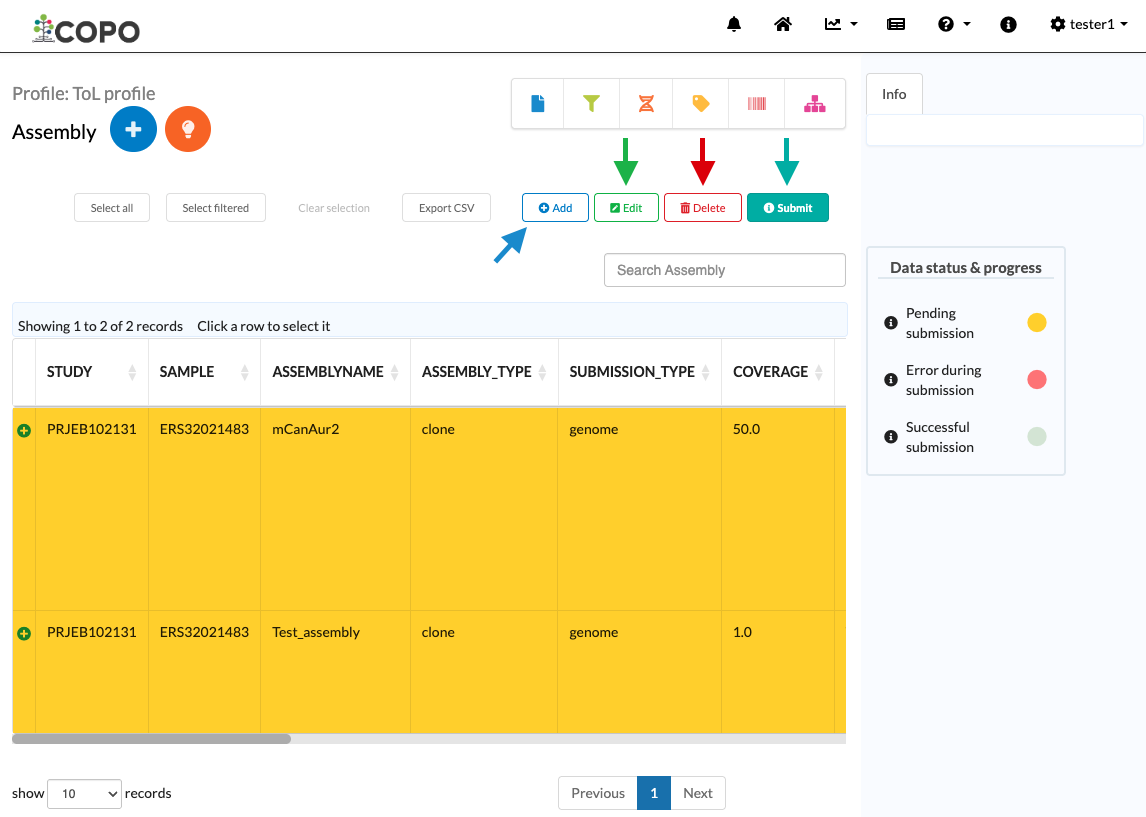
Assembly page: Visualisation of the add, edit, delete and submit action buttons
add_record_all button displays the tooltip
Add recordwhen hovered over and uses a icon. It is indicated by the blue arrow.
edit_record_single button displays the tooltip
Edit recordwhen hovered over and uses icon. It is indicated by the green arrow.
delete_record_multi button displays the tooltip
Delete recordswhen hovered over and uses a icon. It is indicated by the red arrow. The icon and
colour of this button is used on multiple pages with different actions.
icon. It is indicated by the red arrow. The icon and
colour of this button is used on multiple pages with different actions.-
submit_assembly_multi button displays the tooltip
Submit assemblywhen hovered over and uses a icon. The icon and colour used in for this button,
is also used for the submit_annotation_multi, submit_read_multi and
submit_tagged_seq_multi buttons.
icon. The icon and colour used in for this button,
is also used for the submit_annotation_multi, submit_read_multi and
submit_tagged_seq_multi buttons.The difference is in the label assigned and the action performed by the button. The button is indicated by the teal arrow in the image above.
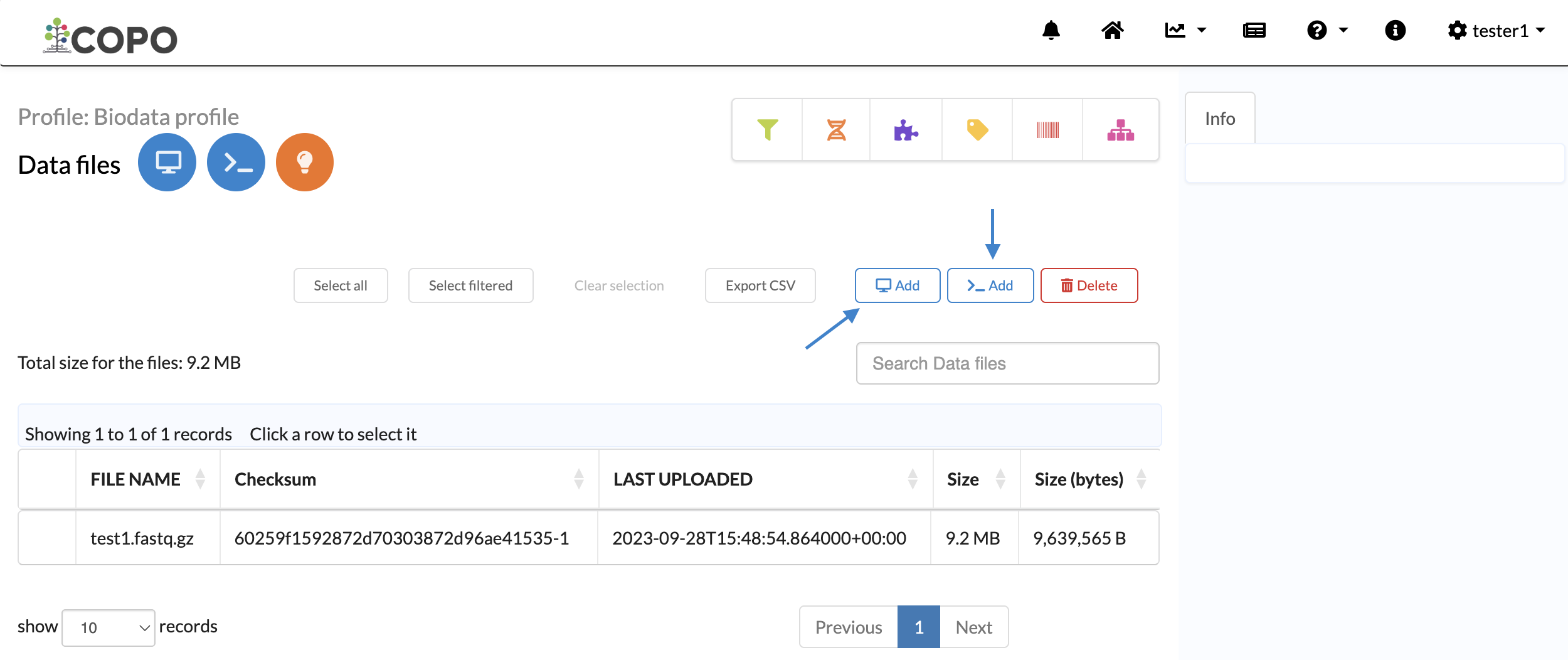
Samples page: Visualisation of the download sample manifest action button, view images action button and download permits action button
add_local_all button displays the tooltip
Add new file by browsing local file
system
when hovered over and uses a icon. It is indicated by the blue arrow
on the right in the image above.
icon. It is indicated by the blue arrow
on the right in the image above.add_terminal_all button displays the tooltip
Add new file by terminalwhen hovered over and uses a icon. It is indicated by the blue arrow on the left
in the image above.
icon. It is indicated by the blue arrow on the left
in the image above.
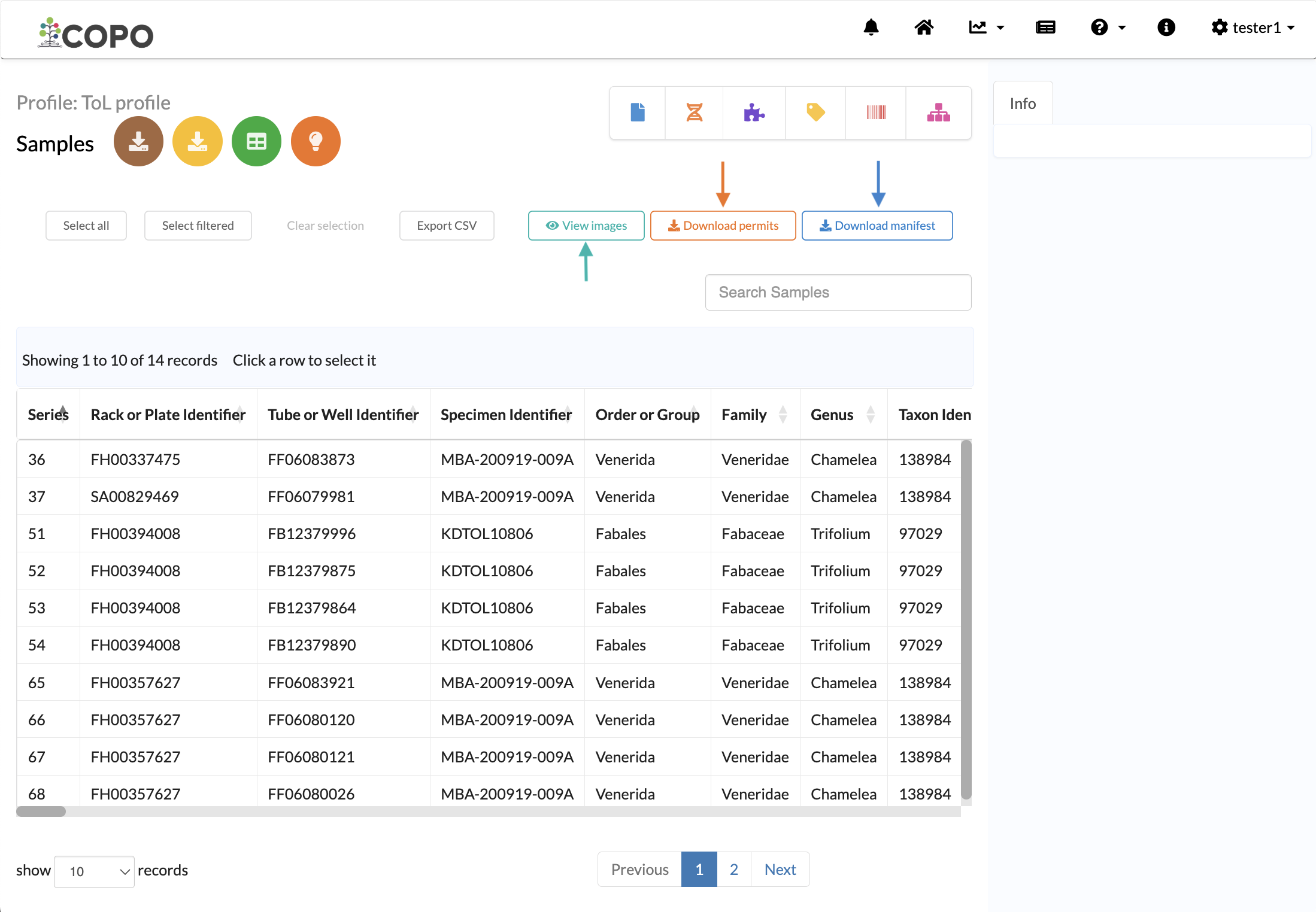
Samples page: Visualisation of the add file via browser record action button and add file via terminal record action button
download_sample_manifest_single button displays the tooltip
Download Sample Manifestwhen hovered over and uses a icon.
It is indicated by the blue arrow in the image above.
icon.
It is indicated by the blue arrow in the image above.view_images_multiple button displays the tooltip
View Imageswhen hovered over and uses a icon. It is indicated by the teal arrow.
download_permits_multiple button displays the tooltip
Download Permitswhen hovered over and uses a icon. It is indicated by the orange arrow.
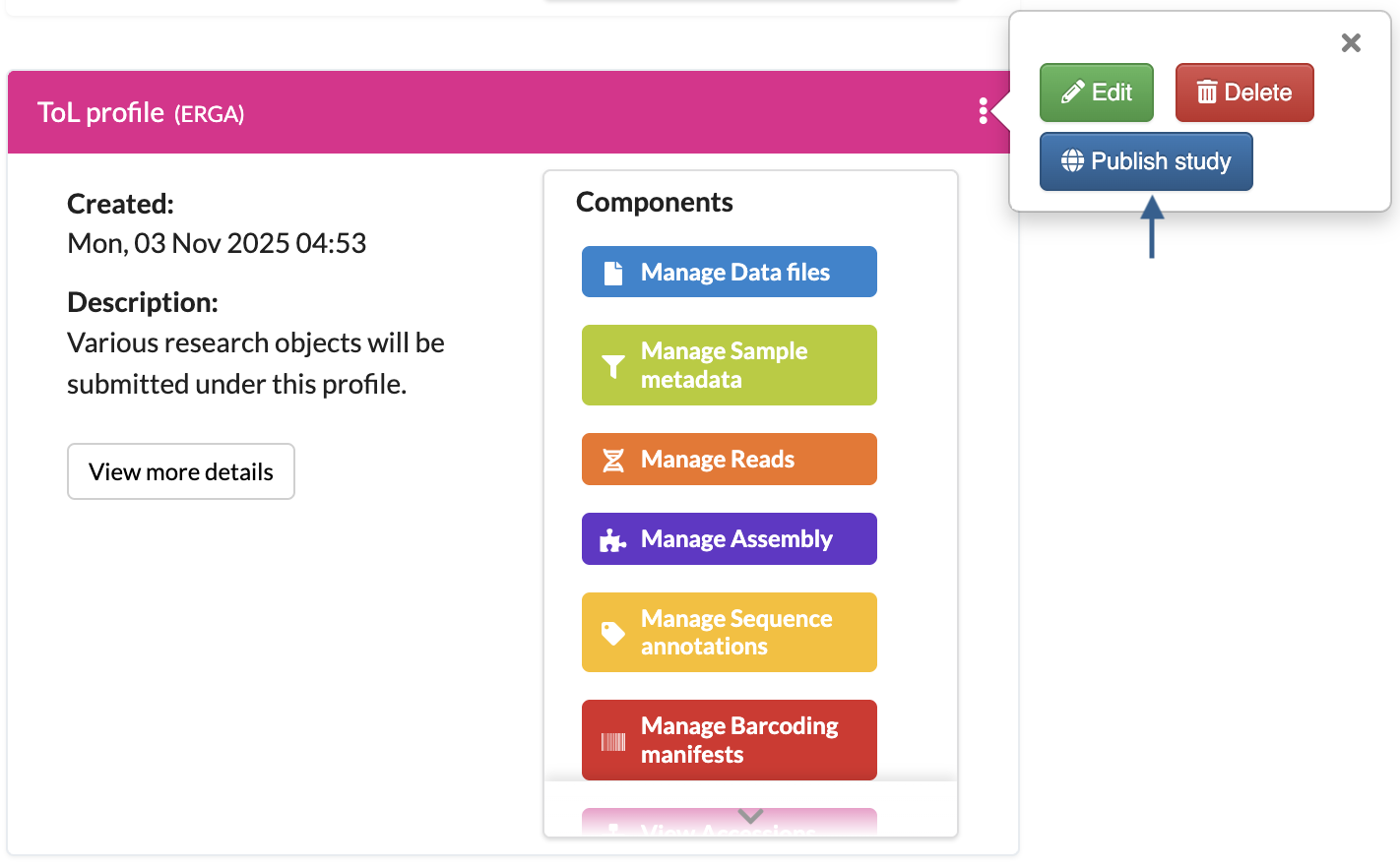
Work profiles page: Visualisation of the publish study record action button on a profile
releasestudy button displays the tooltip
Publish Studywhen hovered over and uses a icon. It is indicated by the blue arrow in the image above.